
You pull up to the gate. You press the remote. Nothing. Or it groans once and stops. Or the light blinks twice and goes dark. The car behind you is already close.
This diagnostic works through the most common failure points in order of how quickly you can check them — from the outlet at the post all the way to the motor output terminals on the control board. Work through them in sequence before calling a technician.
Step 1: Check the power source
Gate opener control boards run on line power from a GFCI-protected outlet or a hardwired circuit. A GFCI outlet that tripped overnight is the single most common cause of a completely non-responsive gate opener — more common than any component failure.
Check the GFCI outlet at the power post (usually at the motor housing or on the nearest wall-mounted junction box). Press the reset button. If the outlet was tripped, the opener will power back on. Also check the circuit breaker at the panel.
If power is confirmed at the outlet and the unit is still dark, move to Step 2.
Step 2: Test with a hardwired button
Before assuming the remote is at fault, rule it out entirely. Most gate controllers have a terminal block labeled OPEN (or PED, or a button input) where a two-wire wall button connects. Press that button directly.
If the gate moves from the hardwired button but not from the remote, the opener is healthy and the fault is in the remote or its radio receiver. If neither the button nor the remote triggers movement, the problem is in the opener itself — continue below.
Step 3: Check the battery backup
Most residential gate openers include a 12V sealed lead-acid battery that backs up the motor during power outages. A failed battery can prevent the control board from operating correctly even when line power is present, because the board monitors battery voltage as part of its startup check.
Measure the battery voltage with a multimeter. A healthy 12V lead-acid battery reads 12.6–12.8V at rest under no load. Below 11.8V at rest, it’s discharged; below 11.4V, it’s unlikely to recover. Disconnect the battery leads and test the opener on line power alone. If it powers on cleanly, the battery is the culprit.
Step 4: Inspect the photo-eye sensors
Photo-eye sensors — the two small devices mounted on either side of the gate path — are responsible for more unexplained gate stoppages than any other single component after power issues. One unit emits an infrared beam; the other receives it. A broken beam tells the controller a person or object is in the gate’s path, and the opener refuses to move.
Check:
- Alignment: both sensors should face each other directly. A mower strike, a delivery box leaning against a post, or even thermal expansion of the mounting bracket can knock them off axis.
- LED color: a steady green on the receiver typically means the beam is clear; a blinking or red light means it’s broken.
- Lens condition: wipe both lenses with a dry cloth. A spider web or condensation on the lens scatters enough infrared to read as a broken beam.
Realigning the sensors is a 60-second fix and resolves a surprisingly high percentage of “gate stopped working” calls.
Step 5: Check the control board status display
Most residential-commercial gate controllers — LiftMaster CSW24UL, FAAC 400 series, DoorKing 1830 series, Mighty Mule boards — include a status LED or small alphanumeric display that shows fault codes when a problem is detected.
Look for a blinking LED pattern or a two-digit code. The specific codes vary by manufacturer and model; consult the opener’s installation manual for the full list. Common fault categories across most brands include: photo-eye obstruction detected, loop detector input open or shorted, motor overcurrent (the gate hit something), and low battery.
A fault code narrows the remaining steps considerably. If the board shows nothing at all — no LEDs, no display activity — the board isn’t getting power, or it has failed.
Step 6: Check the limit switches
Limit switches tell the opener where “fully open” and “fully closed” are. If a limit switch was knocked out of position — by a vehicle that clipped the gate post, by thermal expansion over a hot summer, or by gradual wear — the controller may believe the gate is already at its destination and refuse to run the motor.
On most swing-gate openers, limits are mechanical cam switches or magnetic reed sensors. On slide gate openers, they’re usually magnetic sensors triggered by brackets mounted on the gate rail or the rack. Understanding where these sit in the drive system is covered in How a Residential Gate Opener Actually Works.
Symptom of a misadjusted limit: the opener runs for one or two seconds, stops, and the gate has barely moved. Re-learn the limits per the opener manual’s procedure — on most LiftMaster units this is a two-button “limit learn” cycle that takes under two minutes.
Step 7: Disengage the motor and move the gate by hand
Most residential gate operators have a manual release — a lever or pull-cord on the motor housing — that uncouples the drive mechanism from the gate. Disengaging it tells you whether the problem is mechanical or electrical.
If the gate moves freely by hand: the drive mechanism is healthy; the problem is in the control circuit. Go back to steps 4–6.
If the gate is hard to push or jams: the problem is mechanical. Check for:
- Swing gates: broken or bent actuator arm, seized hinge, stripped clevis pin
- Slide gates: broken rack tooth, obstruction in the track, roller that has come off the guide
Reattach the motor release before testing any electrical functions.
Step 8: Check the remote and rolling-code sync
If the hardwired wall button works but the remote doesn’t, the problem is either a dead remote battery or a rolling-code desync.
Replace the remote battery first. Then, if the remote still doesn’t trigger the opener, re-pair it via the LEARN button on the opener’s control board or motor housing. Rolling-code systems (LiftMaster Security+, Security+ 2.0, FAAC XT rolling code, Genie Intellicode) require this re-pair whenever the counter drifts out of the receiver’s acceptance window.
For HomeLink remotes specifically, the same process applies — the guide to HomeLink rolling-code programming covers the LEARN-button procedure in detail.
Step 9: Check wiring at the control board terminal blocks
Open the motor housing cover and inspect every terminal block connection. Look for:
- A wire that has vibrated out of its screw terminal (common on openers on high-traffic driveways)
- Corroded copper wire ends at aluminum terminals
- Cracked or melted insulation from a heat or surge event
The most critical terminals are the motor output leads (typically marked M+/M– or M1/M2) and the safety input terminals (STOP, OBSTRUCT, sensor inputs). A loose motor terminal causes the opener to energize, hum, and stop immediately without moving the gate.
Step 10: Check for a vehicle-detection loop fault (if equipped)
Some gate installations include an inductive loop — a coil of wire buried in the driveway surface — for vehicle detection. A loop detector fault will stop gate operation cleanly: the controller sees an open circuit on the loop input and locks out the gate.
With the loop detector connected, measure the resistance between the two loop terminals on the controller. A healthy short loop should read well under 5Ω. An open reading (OL on your multimeter) means the buried cable is cut or corroded — typically from landscaping work or ground movement cracking the conduit.
Step 11: Measure motor output voltage under command
With everything reconnected and the gate commanded to open (via wall button), use a multimeter on the DC voltage setting at the motor output terminals. A healthy board delivers rated voltage to the motor during the run cycle.
If you see near-zero volts at the motor terminals while the opener is commanded open — and the wall button is pressed — the control board’s output relay or driver has failed. At that point, the board itself needs replacement. A new control board for a common opener model (LiftMaster, FAAC, DoorKing) typically runs $80–$250 in parts, which is usually less than a service call plus labor.
Step 12: When to call a technician
Some failures are out of scope for homeowner diagnostics:
- Burned smell or visible scorch marks on the control board — a root-cause trace is needed before replacement
- Cut loop cable buried under concrete — requires a saw cut, cable replacement, and re-pour
- Motor draws current but gate doesn’t move with actuator visually spinning — internal gearbox failure; requires motor unit replacement
A qualified gate technician in most US markets charges $100–$175/hour for residential work. Arriving with steps 1–11 completed and a clear fault description saves 30–60 minutes of their diagnostic time.
A note on the underlying architecture
Most of the failure points above — the radio receiver, the remote battery, the rolling-code counter, the limit switch calibration — exist because the traditional gate opener was designed around a handheld clicker. The clicker triggers the opener; the opener moves the gate. It works well until one link in that chain degrades.
A different category of gate access removes some of that failure surface: vehicle-paired automatic opening, where the car itself becomes the trigger. No remote, no rolling-code sync, no battery in a fob to die. Proxly is building that model specifically for residential driveway gates and is currently in pre-launch if the approach is relevant to your situation.
References
- LiftMaster CSW24UL Commercial Swing Gate Operator Installation Manual — LiftMaster (liftmaster.com)
- FAAC Gate Operator Technical Documentation — FAAC Group (faacgroup.com)
- UL 325 Standard for Safety: Door, Drapery, Gate, Louver, and Window Operators and Systems — Underwriters Laboratories (ul.com)
Frequently asked questions
- The two most common overnight failures are a tripped GFCI outlet and a dead battery backup. Both fail silently. Check the GFCI at the power source first — press the reset button and try the opener. Then measure the 12V battery voltage; below 11.8V at rest, it won't recover without a charge.
- A hum without movement means the motor is energized but the mechanical load path is broken. Check the motor output terminal connections on the control board for a loose or corroded wire. Then disengage the motor and inspect the actuator arm or slide-gate rack gear for a sheared pin or broken tooth section.
- Most gate controllers reset by cycling power for 10–30 seconds — unplug or flip the circuit breaker, then restore. If the unit has a status display, note the fault code before resetting. Clearing a fault without correcting the cause will recreate it within minutes or hours.
- Most modern residential gate openers won't cycle at all if the photo-eye safety input is open or disconnected — the controller interprets that condition as a constant obstruction per UL 325 entrapment standards. Disconnect the sensor only for testing purposes; reconnect before returning the gate to normal service.
- On rolling-code systems — LiftMaster Security+, Security+ 2.0, FAAC Xk, Linear Multi-Code — a battery swap can let the remote's internal code counter drift ahead of the receiver's window. Stand within a few feet of the antenna and press the button 10 or more times in rapid succession to advance past the gap and re-sync.
Why did my gate opener stop working overnight with no warning?
My gate opener hums but the gate doesn't move — what's wrong?
How do I reset my gate opener after a fault?
Will a gate opener work if the photo-eye sensor is damaged or removed?
My gate remote stopped working after I replaced its battery. Why?
Keep reading
Why How You Open Your Garage Door Actually Matters
Most car owners don't think about how they open their garage door. After 1,000 button presses a year, they should. Here's the convenience and security case.

Replacing a Dead Gate-Opener Battery (12V vs 24V)
A dead backup battery is the most overlooked cause of a gate opener that stops working during a power cut. Here is how to identify the right replacement and install it safely.
Every Way to Open Your Gate or Garage From Your Car in 2026
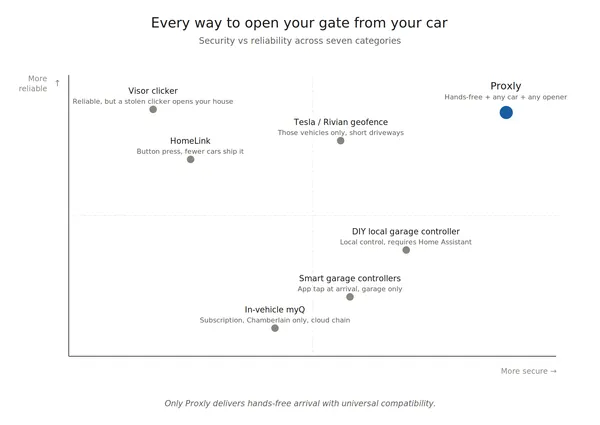
Seven categories of solutions for opening your gate or garage from your car — honest pros and cons, the security note no one mentions, and a side-by-side comparison.